
Install Contour
An on-the-go EQ manager for the CrinEar Protocol Micro, Protocol Max and FiiO KA15. Free and open source.
Latest: 1.3.3 - 4 Oct 2026
Reading this on a computer? Scan to open it on your phone.contoureq.app/install
What you need
- A CrinEar Protocol Micro, Protocol Max or FiiO KA15 USB DACContour works with these three dongles for now. The Micro and the KA15 are tested on the developer's own hardware, the Max by a community member on a real device.
- An Android phone with Android 9 or newerIt needs USB host support (USB OTG). Almost every phone with USB-C has it.
- Nothing elseNo account, no internet connection, no extra hardware.
Contour is unofficial and not affiliated with CrinEar.
Obtainium Recommended
Install once and Contour updates itself from its official releases.
Obtainium Recommended
Install once and Contour updates itself from its official releases.
Obtainium is a free, open-source app that installs apps straight from their official GitHub releases and tells you when an update is out.
-
Install Obtainium first. Get it from its latest release on GitHub. For most modern phones, pick the file ending in
arm64-v8a-release.apk.It is also on F-Droid. More about it on obtainium.imranr.dev.
-
On your phone, tap the button below.
Add Contour to ObtainiumNothing happened? Install Obtainium first (step 1), then tap again.
The first time, Obtainium may ask to send notifications - allow it, that's how it tells you about updates. It may also show a welcome note - tap Okay.
Contour then appears in its list ("Imported 1 app"). The new version may show as "Unknown" at first.
-
Pull the list down to check for updates, then tap the download icon next to Contour.
Android asks once to allow Obtainium to install apps. Turn on Allow from this source, go back and tap Install.
-
Google Play Protect may say "App scan recommended" because it hasn't seen Contour before. Tap Scan app - after the scan the install finishes.
-
Done. Obtainium checks for new versions in the background and offers to update. Your profiles stay.
Button does nothing? It only works on a phone that already has Obtainium. You can add Contour by hand instead: open Obtainium, tap Add app, paste this address and tap Add.
Download the APK
No extra app needed. You install updates yourself.
Download the APK
No extra app needed. You install updates yourself.
-
Download the app file.
Download Contour 1.3.3The file is
contour-1.3.3.apk, about 3.5 MB. If the button fails, get it from the latest release page. -
Open the downloaded file - from the download notification or your Files app.
The first time, Android says installing from this source isn't allowed. Tap Settings, turn on Allow from this source for your browser or file manager, go back and tap Install.
-
Google Play Protect may say "App scan recommended" because it hasn't seen Contour before. Tap Scan app - after the scan the install finishes. You can also check the file yourself.
-
Open Contour.
After installing
Connect the dongle and send your first profile to it.
After installing
Connect the dongle and send your first profile to it.
Plug in your Protocol Micro, Max or KA15.
Allow USB access when Android asks. Tick "always" to skip this next time.
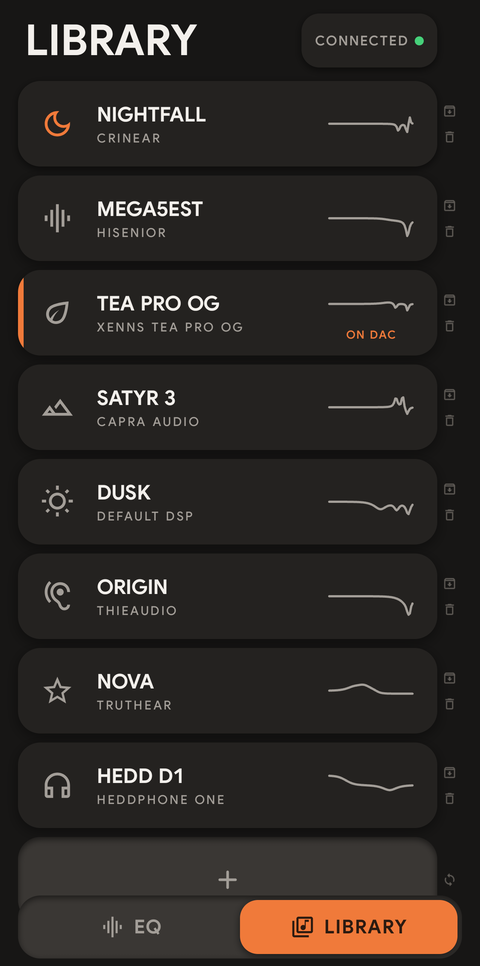
The status shows CONNECTED with a green dot.
Pick a profile in LIBRARY, then hold HOLD TO SEND until it fills. The profile now shows ON DAC.
Unplug and go. The dongle keeps the sound you sent, on any phone or computer.
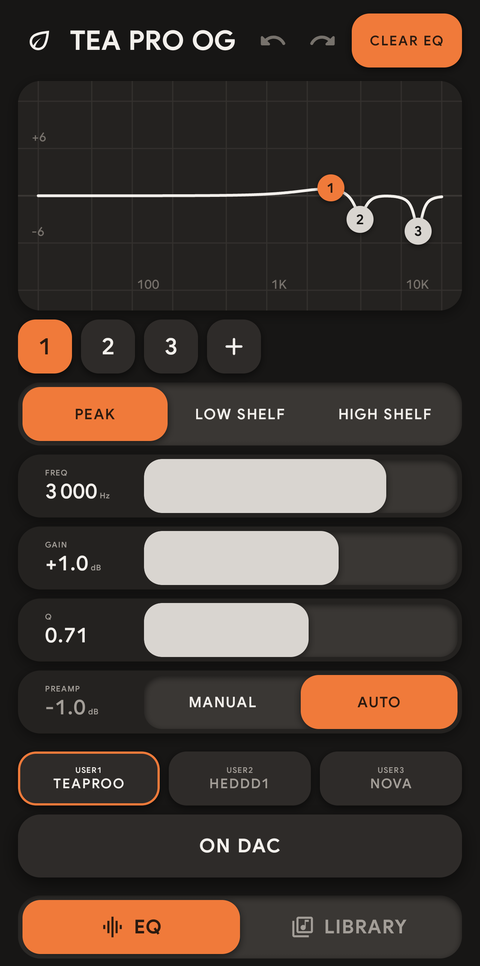
On first launch you get three examples: PROFILE 1 (flat), NIGHTFALL and DUSK.
Everything else is in the guide: a 6-minute film with chapters, and the full text.
Check that the APK is genuine
The signing key and checksums to confirm your copy is official.
Check that the APK is genuine
The signing key and checksums to confirm your copy is official.
Every official build is signed by Chronosaur with the same key. If these match, the app is the real one.
io.github.chronosauros.contour
C8:C8:CA:EA:76:16:28:ED:9D:50:5F:F0:73:42:EE:5E:A0:D4:66:A4:AD:71:8D:0D:B0:77:42:2B:A3:F7:E6:01
CN=Chronosaur
Easiest: AppVerifier
AppVerifier is a free app (also on Accrescent and F-Droid) that compares an app's signature with the one you give it.
io.github.chronosauros.contour C8:C8:CA:EA:76:16:28:ED:9D:50:5F:F0:73:42:EE:5E:A0:D4:66:A4:AD:71:8D:0D:B0:77:42:2B:A3:F7:E6:01
Copy it, open AppVerifier, pick Contour (if installed) or the downloaded APK, and it confirms the match.
File checksum
Each release lists the APK's SHA-256 in its release notes. For the latest version:
1d918da9e79518e70f161335dcb319fcae8cd9f691326d3438743d111c6c1cea
For developers
apksigner verify --print-certs contour-1.3.3.apk
It should print CN=Chronosaur and this digest (lowercase, no colons):
c8c8caea761628ed9d505ff07342ee5ea0d466a4ad718d0db077422ba3f7e601
Updating and your profiles
What keeps your saved profiles safe, and the two things that don't.
Updating and your profiles
What keeps your saved profiles safe, and the two things that don't.
- Updates never touch your saved profiles. Installing over the existing app keeps everything.
- Switch freely between Obtainium and the direct APK. They are the same app with the same signature.
- A copy you built yourself is different. It has a different signature, so an official release can't install over it. Android says "App not installed".
- Going back to an older version isn't possible without uninstalling.
- Uninstalling removes your profiles. Back them up first: in the Library, long-press a profile and tap SHARE. See More in the Library in the guide.
Troubleshooting
Fixes for the most common install and connection problems.
Troubleshooting
Fixes for the most common install and connection problems.
- "App not installed"
- Either a copy you built yourself is installed (different signature), or a newer version is already on the phone. Back up your profiles, uninstall the old copy, then install again.
- Play Protect says "App scan recommended"
- Google hasn't seen Contour before. Tap Scan app - after the scan the install continues.
- The Obtainium button does nothing
- Obtainium isn't installed yet, or you're on a computer. Install Obtainium on your phone, or use the manual way (Add app, paste the address).
- The status stays NO DAC
- Plug the dongle in again, firmly, without adapters or hubs. The phone must support USB OTG; some phones have an OTG switch in Settings that needs to be turned on.
- It says TAP TO CONNECT
- Tap it and allow USB access when Android asks.
- Obtainium says "rate limited"
- GitHub limits how often apps can check without an account. Try again later, or add a GitHub token in Obtainium's settings.
Still stuck? Ask on GitHub Issues.
Coming later: app stores
F-Droid is on the way.
Coming later: app stores
F-Droid is on the way.
Contour has been prepared for F-Droid; this page will link it once it's live. F-Droid will ship the same APK signed by the same key, so switching between Obtainium, a direct download and F-Droid won't need a reinstall.